XRForge is a tiny, powerful tool to interconnect XR experiences via 3D portals...like a federated viverse.com
An open, seamless XR web built from simple URLs and directories, without gatekeepers, built upon Next Generation Internet (NGI) specs:

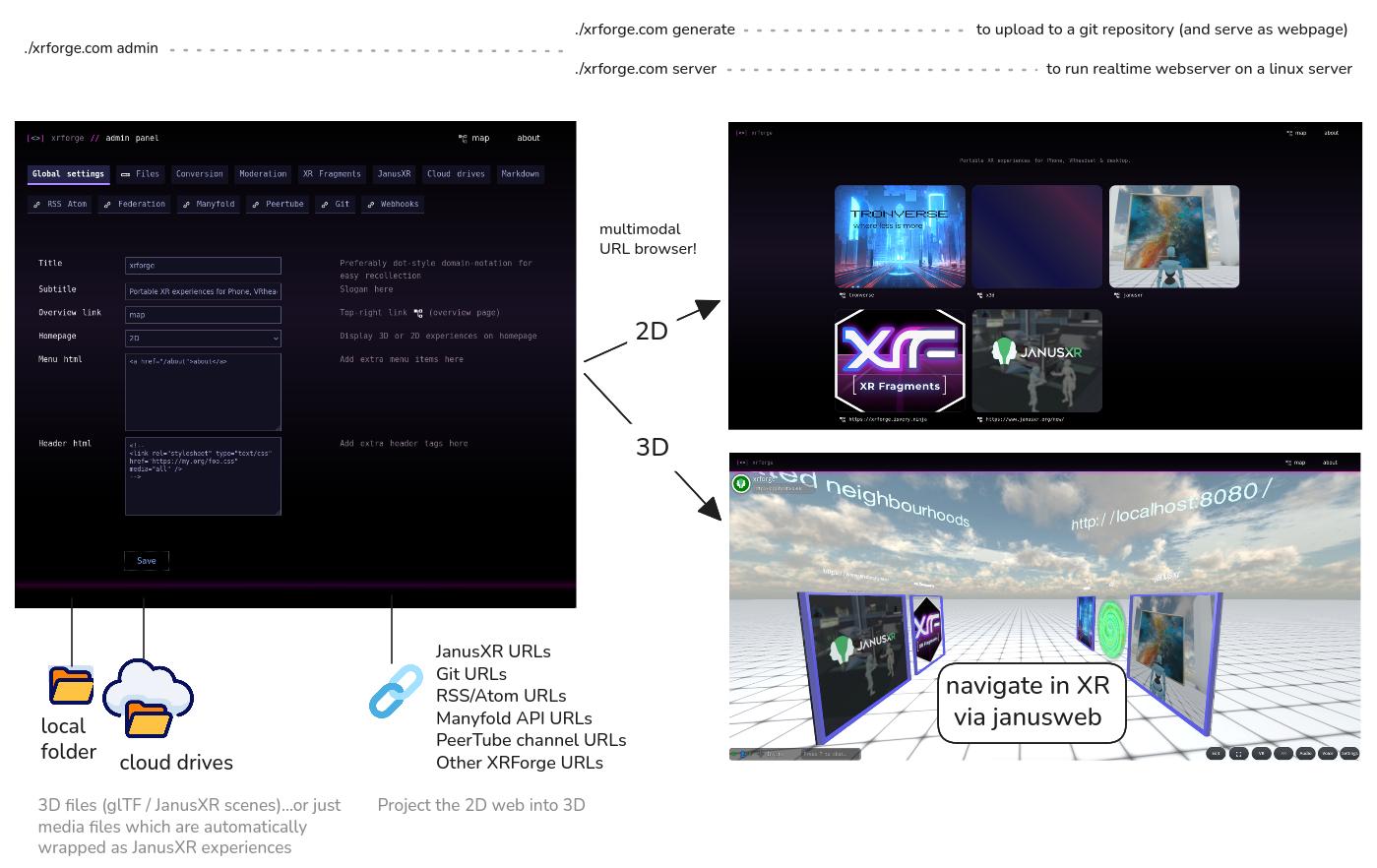 * turn everyday directories into 3D portals.
* seamlessly "surf" interconnected spatial webs on XR headsets
* transforms local/remote filesystems into interconnected 3D spaces.
* 3D (hyperlink) file browser for AR/VR
* automatic portal system, recursive symlinks supported
* infinite horizontally scaling ecosystems thanks to URLs (not databases)
```
┌───────────────────────────────────┐ ┌──────────────────────────────────────────┐
│ local disk │ │ Surf via 3D portals │
├───────────────────────────────────┤ └──────────────────────────────────────────┘
│ │
│ /myverse │ https://my.org/myverse
│ /elearnings │ https://my.org/myverse/elearnings
│ /elearning1/1.glb │ https://my.org/myverse/elearning/elearning1
│ /elearning2/2.glb │ https://my.org/myverse/elearning/elearning2
│ │
│ ┌──────────────────────────────┐ │
│ │ github / webdav / dropbox etc│ │
│ │ │ │
│ │ /mygames │ │ https://my.org/myverse/mygames
│ │ /biggusgateWebXR │ │ https://my.org/myverse/mygames/biggusgate
│ │ /spasca │ │ https://my.org/myverse/mygames/spasca
│ │ /otherxrforge │ │ https://my.org/myverse/otherxrforge
│ │ │ │
│ │ ┌───────────┐ ┌───────────┐ │ │
│ │ │/manyfold │ │archive.org│ │ │ https://my.org/myverse/manyfold
│ │ └───────────┘ └───────────┘ │ │ https://my.org/myverse/myarchive
│ │ │ │
│ │ +40 integrations via rclone │ │
│ └──────────────────────────────┘ │
└───────────────────────────────────┘
```
## Usage / Radical Opensource
```bash
$ ./xrforge.com
Usage: ./xrforge.com [opts]
./xrforge.com admin launch adminpanel to configure stuff (/admin)
./xrforge.com generate generate www-folder with XR experiences
./xrforge.com help display all possible flags
./xrforge.com createplugin generates skeleton plugin
./xrforge.com server starts the webserver [without --nobrowser]
./xrforge.com test run testsuite (selftest)
```
Extract and run example 3D content in your browser:
```bash
$ unzip xrforge.com myverse/* # extract example 3D verse files
$ ./xrforge.com server # run as server
opening your browser at https://localhost:8080
```
## Radical opensource
```
$ unzip xrforge.com
Archive: result/bin/xrforge.com
Length Date Time Name
--------- ---------- ----- ----
3992 08-03-2026 09:54 .init.lua
242 08-03-2026 09:46 cmd/server.lua
1014 07-23-2026 16:13 cmd/createplugin.lua
580 07-24-2026 16:12 cmd/help.lua
....
```
> Profit! you have aqcuired the sourcecode from the binary: run and distribute modified versions if needed ♥
## Adding content
First you need a directory with glTF or JanusXR experiences.
* turn everyday directories into 3D portals.
* seamlessly "surf" interconnected spatial webs on XR headsets
* transforms local/remote filesystems into interconnected 3D spaces.
* 3D (hyperlink) file browser for AR/VR
* automatic portal system, recursive symlinks supported
* infinite horizontally scaling ecosystems thanks to URLs (not databases)
```
┌───────────────────────────────────┐ ┌──────────────────────────────────────────┐
│ local disk │ │ Surf via 3D portals │
├───────────────────────────────────┤ └──────────────────────────────────────────┘
│ │
│ /myverse │ https://my.org/myverse
│ /elearnings │ https://my.org/myverse/elearnings
│ /elearning1/1.glb │ https://my.org/myverse/elearning/elearning1
│ /elearning2/2.glb │ https://my.org/myverse/elearning/elearning2
│ │
│ ┌──────────────────────────────┐ │
│ │ github / webdav / dropbox etc│ │
│ │ │ │
│ │ /mygames │ │ https://my.org/myverse/mygames
│ │ /biggusgateWebXR │ │ https://my.org/myverse/mygames/biggusgate
│ │ /spasca │ │ https://my.org/myverse/mygames/spasca
│ │ /otherxrforge │ │ https://my.org/myverse/otherxrforge
│ │ │ │
│ │ ┌───────────┐ ┌───────────┐ │ │
│ │ │/manyfold │ │archive.org│ │ │ https://my.org/myverse/manyfold
│ │ └───────────┘ └───────────┘ │ │ https://my.org/myverse/myarchive
│ │ │ │
│ │ +40 integrations via rclone │ │
│ └──────────────────────────────┘ │
└───────────────────────────────────┘
```
## Usage / Radical Opensource
```bash
$ ./xrforge.com
Usage: ./xrforge.com [opts]
./xrforge.com admin launch adminpanel to configure stuff (/admin)
./xrforge.com generate generate www-folder with XR experiences
./xrforge.com help display all possible flags
./xrforge.com createplugin generates skeleton plugin
./xrforge.com server starts the webserver [without --nobrowser]
./xrforge.com test run testsuite (selftest)
```
Extract and run example 3D content in your browser:
```bash
$ unzip xrforge.com myverse/* # extract example 3D verse files
$ ./xrforge.com server # run as server
opening your browser at https://localhost:8080
```
## Radical opensource
```
$ unzip xrforge.com
Archive: result/bin/xrforge.com
Length Date Time Name
--------- ---------- ----- ----
3992 08-03-2026 09:54 .init.lua
242 08-03-2026 09:46 cmd/server.lua
1014 07-23-2026 16:13 cmd/createplugin.lua
580 07-24-2026 16:12 cmd/help.lua
....
```
> Profit! you have aqcuired the sourcecode from the binary: run and distribute modified versions if needed ♥
## Adding content
First you need a directory with glTF or JanusXR experiences.
Just run this in the terminal:
```bash
$ unzip xrforge.com myverse
$ tree myverse
myverse
├── janusxr
│ ├── helloworld
│ │ └── janusxr.xml
│ ├── janusxr.png
│ └── tronverse -> ../tronverse <---
└── tronverse | recursive portals allowed
├── janusxr -> ../janusxr <--- via symlinks
├── tron
│ ├── README.md
│ ├── tron.glb
│ ├── tron.mp3
│ └── tron.png
└── tronverse.png
```
> optionally you can run `./xrforge.com admin` and change the `myverse` directory if needed.
Now xrforge.com will scan that local folder:
```bash
$ ./xrforge.gom
scanning experiences (this make take a while..)
✅ └─ plugin/diskscan: detected .png thumbnail file
✅ ./myverse/janusxr 10927498
✅ ./myverse/janusxr/helloworld 10927500
✅ └─ plugin/janusxr: janusxr.xml
✅ └─ plugin/diskscan: detected .png thumbnail file
✅ └─ plugin/diskscan: detected .png thumbnail file
✅ ./myverse/tronverse 10927503
✅ └─ plugin/diskscan: detected .png thumbnail file
✅ ./myverse/tronverse/tron 10927504
✅ └─ plugin/xrfragments: detected .png sidecarfile
✅ └─ plugin/markdown: detected README.md
✅ └─ plugin/diskscan: detected .png thumbnail file
ℹ️ ./myverse/janusxr/tronverse
✅ └─ plugin/diskscan: detected symlink..creating portal
ℹ️ ./myverse/tronverse/janusxr
✅ └─ plugin/diskscan: detected symlink..creating portal
```
## Customizing
After first (in the terminal) run a lua config file is created, which you can edit:
```bash
$ xrforge.com
$ ls
xrforge.com
xrforge.lua
```
With basic HTML/CSS skills you can edit the templates by running this in the terminal:
```bash
$ unzip xrforge.com page css
$ ls
page css
```
> Profit! You can now edit the extracted html-templates and css-files, they will be detected automatically when running xrforge.com
Optionally you can re-distribute `xrforge.com` with your modifications by running `zip xrforge.com page`
## Distribute: your own executable
You can preload the `xrforge.com` binary with your own experiences as a single-executable-file:
```
$ zip -r xrforge.com myverse # add my 3D experiences to the binary
$ cp xrforge.com myproject.com
```
> Profit!
## Distribute: static website
Generate a static website:
```
$ ./xrforge.com generate baseurl=/mysubfolder/
✅ finished generating 'www' folder
```
A convenient way is forking [this github repo](https://github.com/coderofsalvation/xrforge-website-example)
to automatically obtain a xrforge-generated github page.
> NOTE: passing extra flags (run `xrforge.com help` for all flags) is important when running the website in a subfolder (`baseurl=...` e.g.)
## Distribute: selfhosting on a server
BAREMETAL:
```bash
$ ./xrforge.com server
```
> **NOTE**: if the binary does not work on your server, use [xrforge-x86_64]() from the releases section instead.
DOCKER: to prevent polluting the environment with terabytes of docker-images, just run this:
```bash
$ docker run -d -p 8080:8080 -w /app -v $(pwd):/app busybox /app/xrforge.com server
```
## Plugins
xrforge is basically plugins working together.
You can create your own plugins by running:
```bash
$ ./xrforge.com createplugin > xrforge.myplugin.lua
```
Look in the [src/plugin](src/plugin) directory for examples
## Developing
```bash
$ source .env # not needed if your system has autoenv
$ build # fast: repeatable build
$ rebuild # faster: lua-repeatable build
$ nix-build # slow: reproducable nix build (for experts)
```
Then run with debug flag to see output of `trace()` calls
```bash
$ DEBUG=1 result/bin/xrforge.com
```
> Testing: run the builtin testrunner: `cd src && ../result/bin/xrforge.com test`
Use `ARCH=x86_64 build` to enforce x86_64 output (instead of a cosmopolitan binary)
> **NOTE**: this is a **static webgenerator-first**-and-server-**last** project, hence it is restricted to [GET requests](src/middleware/onlyGET.lua) (unless authenticated as admin). Going beyond this paradigm is considered unsafe and out of scope.
## Permacomputing Spirit
* developed on [Dillo](https://dillo-browser.github.io/) as lowest common denominator / compatibility
* does not use javascript (WebXR viewer being the exception)
* gracefully degrades to admin/filebrowser for >noscript>/potato-browsers
* server is using lua-scripting via cosmopolitan libc's [redbean](https://redbean.dev)
> So yes, the codebase/html/css is intentionally 90-ish: that's **exactly why it gracefully degrades** on potato-devices.
## Credits / Made with
* [redbean](https://redbean.dev)
* [soakbean](https://github.com/coderofsalvation/soakbean)
* [xrfragments](https://xrfragment.org)
* [janusxr](https://github.com/jbaicoianu/janusweb)
* [janusweb](https://janusxr.org)
## Ideas
* tabs horizontal stacked for xrforge.max.css
* fuzzy search: https://github.com/ssimonp/FuzzySearch-Roblox
* landingpage = /about
* scan functions in xrforge.lua / .xrforge
* video-hover: https://codepen.io/coderofsalvation/pen/YPNOyqx
NOTES:
## Scan manyfold
-------------
```
manual scan (via cli?)
curl -L -X 'GET' 'http://xrforge.isvery.ninja/models?page=1&order=name' -H 'accept: application/vnd.manyfold.v0+json'
curl -L -X 'GET' 'http://xrforge.isvery.ninja/models?page=1&order=recent' -H 'accept: application/vnd.manyfold.v0+json'
```
```
/admin.lua <--- define other instances..for CORS allow / mount http
configure in-zip or filesystem-cache
opendirectory.lua <--- mount other instances over http (via xrforge or rclone)
.xrforge/hook/scandir <-- event to hook
scan files
---------- middleware/xrexperience.lua
| events: ---------------------
+ file type: sidecarfile
+ sidecarfiles ---> regex = {"\.glb", "\.png", "\.vtt"}
| regex_minmatch = 2
+ folder viewer = /view/janusweb/#janus.url=${file}.glb
template = [[
...
]]
```